Origin Data Rescue
Read the numbers out of Origin project files without Origin and without Windows, and export them to CSV.
.opj, .opju, and Origin graphs embedded in PowerPoint, Word or Excel files) when Origin is not available.Result: ✅ A pure-Python reader, written from scratch from the files themselves, with a small window and a command line. It reads numeric columns with their long names and units, and lists every column it cannot decode instead of guessing. Status: early and experimental.
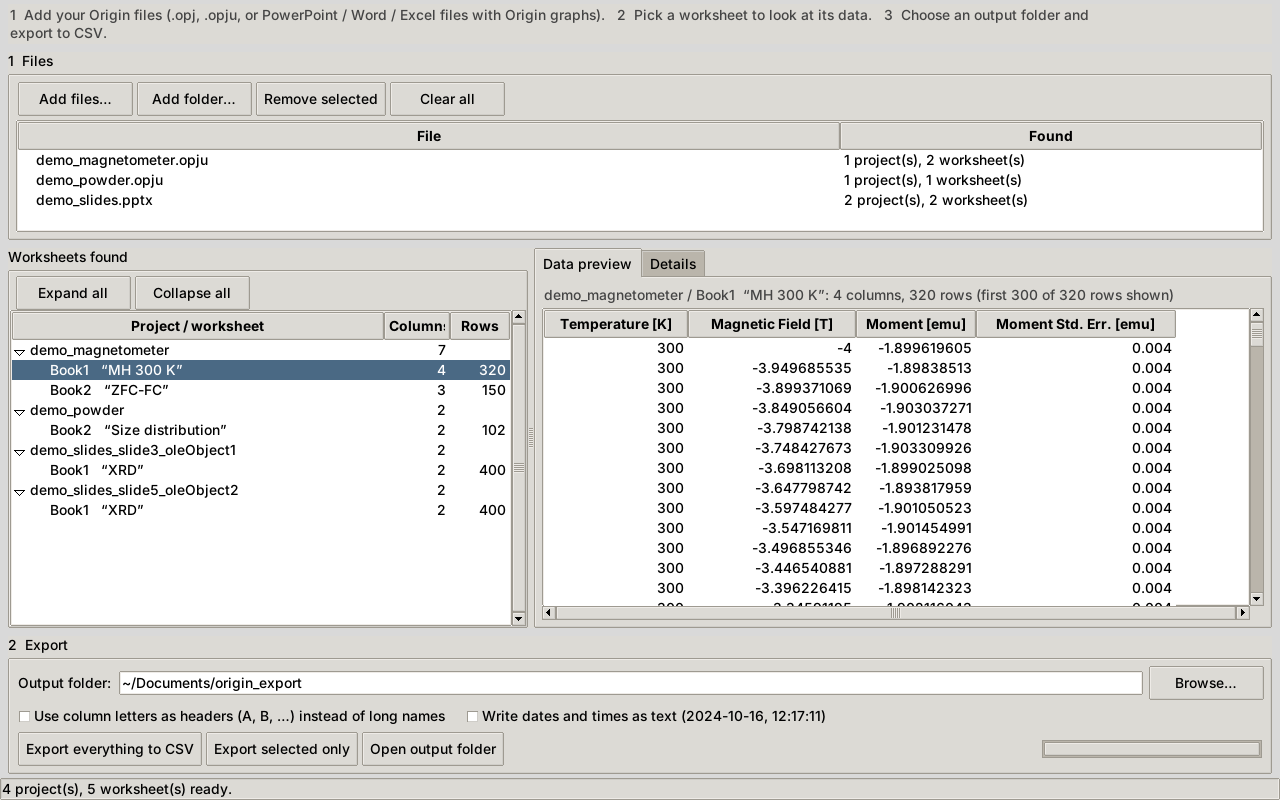
The window on demo files. Left: the worksheets found in two .opju projects and a PowerPoint file. Right: a preview of the first 300 rows, with long names and units as headers. No real measurement data is shown.
Why
Origin, a common program for measurement data, runs on Windows. Projects written with it hold years of data, and when the program or the machine is gone, so is the access. This is the same instinct as the rest of my work: the numbers should outlive the software that wrote them.
What it reads
| Source | Numeric columns | Names, units, comments | Text cells |
|---|---|---|---|
.opj (file versions 4.2946, 4.3024) | yes | yes, with the import file path | no |
| Graphs embedded in .pptx / .docx / .xlsx | yes, also the older 4.2946 graphs | yes, where a workbook is embedded | no |
.opju (file versions 4.3445, 4.3721) | yes | yes, plus sheet names and date/time formats | no |
How it was checked
The reader was compared with values that are independent of it. On one instrument project, 60 numeric columns equal the instrument’s own CSV export in every row, and all 69 long names and units equal the header and units rows of that CSV. Other checks use instrument standard series, distributions that must sum to 100 %, and the preview images stored in the files. Every column the reader cannot decode is listed with the reason, and objects found without a recognised record header are labelled “searched”. Nothing is guessed. Because the reader is written from the files themselves, FORMAT.md in the repository records what is known and how each point was verified.
How to use it
The window: run python -m origin_rescue without file names. Add files or a whole folder, pick a worksheet to preview, choose the output folder, and press Export everything to CSV (or only the selected worksheet or project). Files that cannot be read are reported and do not stop the others, and existing files are never replaced without asking. It needs only the Python standard library (tkinter). On Windows, origin_rescue_gui.pyw can be double-clicked, and a stand-alone program can be built with PyInstaller.
The command line: python -m origin_rescue project.opju slides.pptx -o export/ writes one CSV per worksheet, plus one JSON file per project with short name, long name, units, comment, import file and number format for every column. The window writes exactly the same files; this was checked byte for byte on real projects. There is also a small Python interface (projects, read, read_labels) for use in scripts.
Clean room
The reader is written from the files, not from other readers. The long-standing open reader liborigin is under the GPL and was not used. A second clean-room reader announced elsewhere was not consulted either. The compression of the newer files follows a published method for double-precision data (Burtscher and Ratanaworabhan, IEEE Transactions on Computers 58, 2009). The tool reads your own data from files Origin wrote; it does not use or modify Origin, and it is not affiliated with or endorsed by OriginLab Corporation.
Status and limits
| Item | Status |
|---|---|
Numeric columns, long names and units from .opj, .opju and embedded graphs | ✅ works, checked against independent values |
| Window and command line, same output | ✅ works |
| Text cells | ☐ not read |
| Other file versions | ☐ only the versions in the table above have been tested |
| Tests | ✅ codec, labels, export logic and window tests; checks on real files need sample files, which are not distributed |
| Overall maturity | ⚠️ early and experimental |
Get it
Origin Data Rescue on GitHub. The README has the install and start commands.