Replaced Google's cloud ecosystem with a fully self-hosted analytics pipeline — Docker, Postgres, Metabase, and VS Code — running entirely on local infrastructure.
The GoExplore project originally relied on Google Sheets, BigQuery, and Looker Studio — all US-hosted cloud services. For a European team processing retail sales data, this creates GDPR exposure: data leaves the EU, vendor lock-in is real, and costs scale unpredictably.
The goal was to rebuild the same analytical capability — data storage, SQL querying, and KPI dashboards — using only open source tools running locally, with zero dependency on any external cloud provider.
📁
CSV Files
GoExplore datasets
→
🐘
PostgreSQL 18
Local Mac install
→
🐳
Metabase
Docker container
→
📊
Dashboards
localhost:3000
Google Tool
Open Source Replacement
Hosting
Google Sheets
PostgreSQL 18 + CSV upload
Local Mac
BigQuery
PostgreSQL 18 (Postgres.app)
Local Mac
Looker Studio
Metabase Community Edition
Docker
Cloud SQL editor
VS Code + SQLTools
Local
Docker Setup
Cleaning the environment & deploying Metabase
Before building anything, the local Docker environment was in a messy state — a legacy Apache Superset stack left over from a previous attempt, plus several orphaned containers holding onto ports. Getting to a clean slate was the first real engineering challenge.
Problem 1 — Port conflicts
The first nginx container launch failed immediately on port 8080. The second attempt on port 8081 failed too. Both ports were held by stopped (but not removed) containers — a common Docker pitfall.
# Error on port 8080
docker run --name website -p 8080:80 nginx
→ Bind for 0.0.0.0:8080 failed: port is already allocated# Error on port 8081 too
docker run --name website -p 8081:80 nginx
→ Bind for 0.0.0.0:8081 failed: port is already allocated# Diagnosis: find what owns the port
lsof -i :8080
docker ps -a # stopped containers still hold ports
Problem 2 — Legacy Superset stack
A full Apache Superset installation was discovered: 11 containers (running and stopped), ~8GB of images across 14 image layers, and 11 named volumes. The decision was to remove everything and start clean.
Removed
11 containers
Including superset, worker, worker-beat, websocket, init, node, nginx, redis, postgres
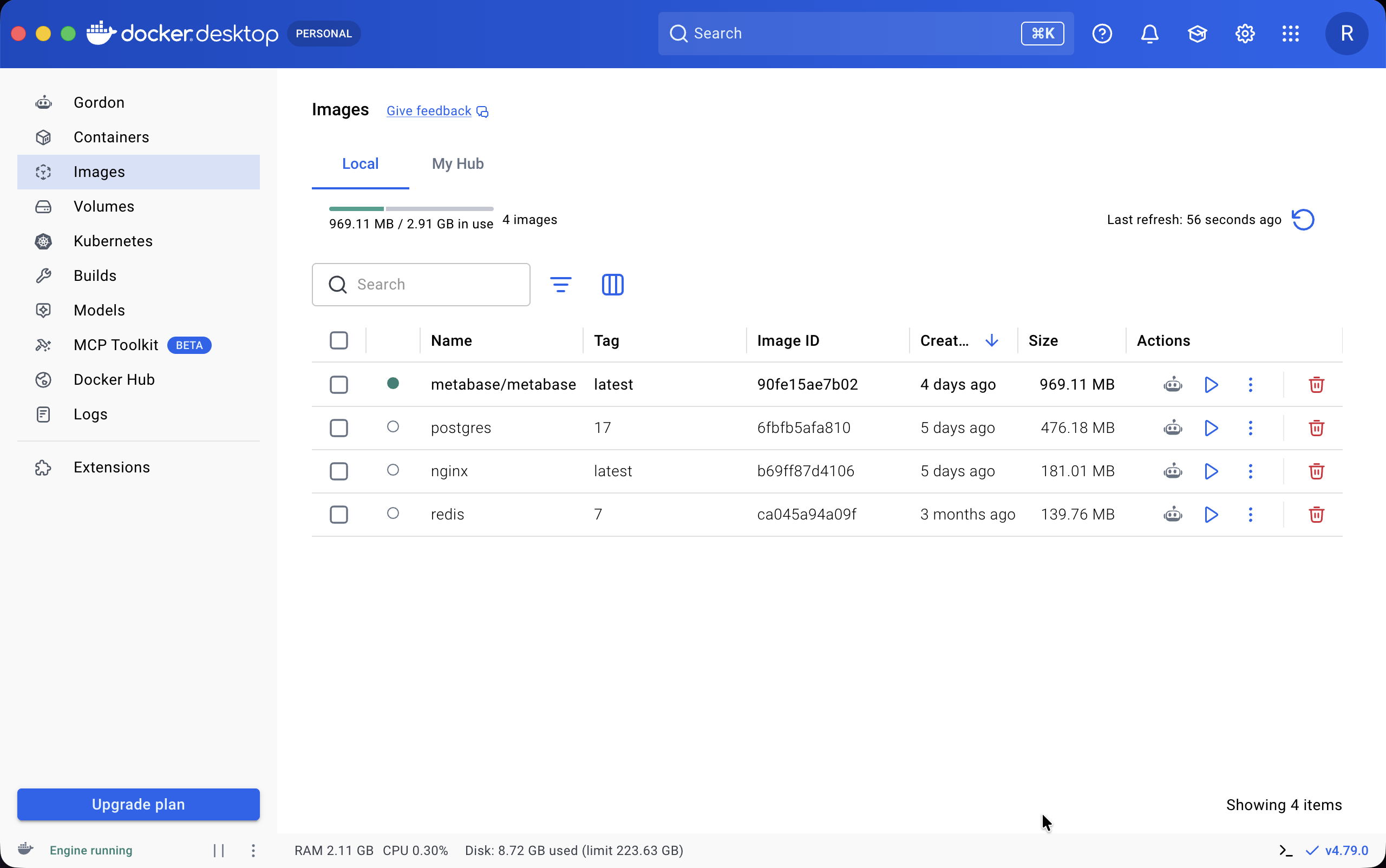
Result: From 14 images and 11 containers down to 3 lightweight base images. ~8GB freed in under 2 minutes.
Deploying Metabase with docker-compose
With a clean environment, Metabase was deployed as a single container pointed at the native Postgres 18 instance. The critical networking detail: Docker containers on Mac cannot reach localhost — they must use host.docker.internal instead.
# Create the Metabase app database first
psql -h localhost -U postgres -c "CREATE DATABASE metabase;"# Launch
docker compose up -d
# Watch for "Metabase Initialization COMPLETE"
docker logs -f metabase
Metabase initialized in 8 seconds and ran 1,125 database migrations against Postgres 18 on first boot. Available at http://localhost:3000 immediately after.
Data Setup
Loading the GoExplore dataset
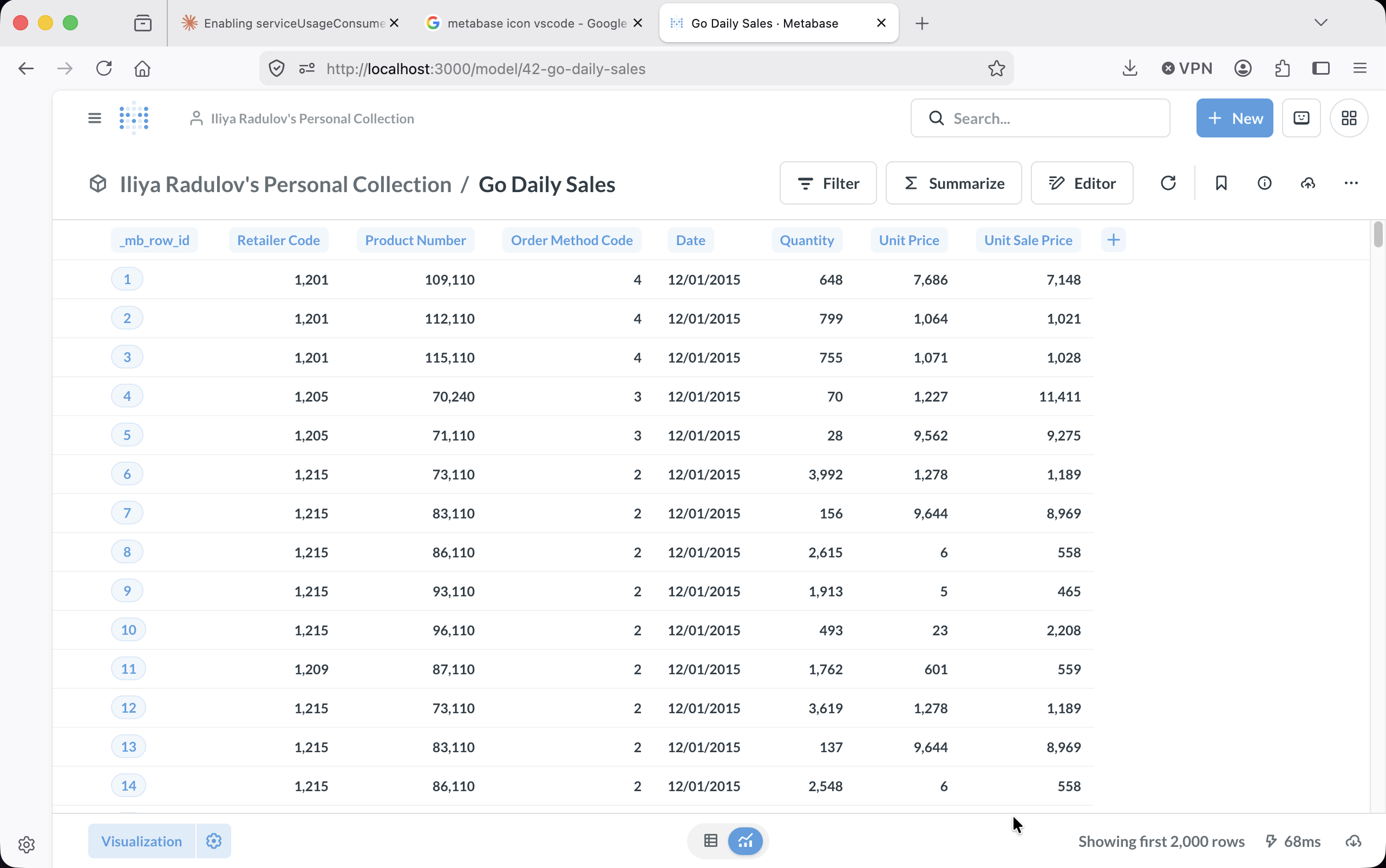
The GoExplore dataset consists of four CSV files covering retail sales activity across 21 countries. Rather than uploading to a cloud warehouse, all files were loaded directly into a local Postgres 18 instance via Metabase's built-in CSV upload — no ETL pipeline required.
1
Docker environment cleanup
Removed a legacy Apache Superset stack (~8GB of images) and 11 orphaned containers, leaving only nginx, postgres:17, and redis as base images.
2
Metabase deployment
Single docker-compose.yml with Metabase pointing at the native Postgres 18 instance via host.docker.internal — the Docker bridge to the Mac's localhost.
3
CSV upload → Postgres tables
Four CSV files uploaded via Metabase's UI. Each becomes a Postgres table automatically — no schema definition needed.
4
VS Code SQL connection
SQLTools + PostgreSQL driver installed. Connected directly to the metabase database where the go_ tables live.
-- Four tables created from CSV uploadSELECT table_name, COUNT(*) AS rows
FROM information_schema.tables t
JOIN (
SELECT table_name, COUNT(*) FROM go_daily_sales_20260625183936 UNION ALLSELECT table_name, COUNT(*) FROM go_products_20260625183647 UNION ALLSELECT table_name, COUNT(*) FROM go_retailers_20260625183636 UNION ALLSELECT table_name, COUNT(*) FROM go_methods_20260625184054
) counts ON t.table_name = counts.table_name
WHERE t.table_name LIKE'go_%';
Three KPIs were selected to answer the two business questions: new market potential (European expansion) and channel performance (specialty vs. general retailers).
KPI 1
Avg Order Value by Country
Baseline metric for the expansion project. Shows which existing markets generate the most revenue per order — a benchmark for the 4 new target countries.
AVG(quantity × unit_sale_price) GROUP BY country
KPI 2
Specialty vs General Retailer
Directly answers the Head of Retailer Connections' question. Compares AOV and order volume across all 7 store types.
AVG(quantity × unit_sale_price) GROUP BY type
KPI 3
Avg Product Price by Category
Explains why AOV differs across channels. Golf Equipment leads — specialty stores carry premium products, which drives their higher order values.
AVG(unit_price) GROUP BY product__line
Key insight: Singapore and Mexico lead in average order value. Golf Equipment is the highest-priced category by a significant margin — explaining why Golf Shops show the strongest AOV among specialty retailers.
SQL
Queries behind the dashboards
All three KPIs are powered by SQL queries written in VS Code and executed directly in Metabase. No ORM, no abstraction layer — plain SQL against Postgres.
KPI 1 — Average Order Value by Country
SELECT
  r.country,
  ROUND(AVG(s.quantity * s.unit_sale_price), 2) AS avg_order_value,
  COUNT(*) AS total_orders
FROM go_daily_sales_20260625183936 s
JOIN go_retailers_20260625183636 r
  ON s.retailer_code = r.retailer_code
GROUP BY r.country
ORDER BY avg_order_value DESC;
KPI 2 — Specialty vs General Retailer Performance
SELECT
  r.type,
  ROUND(AVG(s.quantity * s.unit_sale_price), 2) AS avg_order_value,
  COUNT(*) AS total_orders
FROM go_daily_sales_20260625183936 s
JOIN go_retailers_20260625183636 r
  ON s.retailer_code = r.retailer_code
GROUP BY r.type
ORDER BY avg_order_value DESC;
KPI 3 — Average Product Price by Category
SELECT
  p.product__line,
  ROUND(AVG(p.unit_price), 2) AS avg_price
FROM go_products_20260625183647 p
GROUP BY p.product__line
ORDER BY avg_price DESC;
VS Code Environments
Four ways to query data from one editor
Following the two-world approach from the team guide, VS Code became the single development environment for querying both the local Postgres stack and the shared Google BigQuery project. Four distinct query methods were explored — each with different trade-offs for speed, reproducibility, and output format.
World 1 — Local
🗄️ .sql file + SQLTools
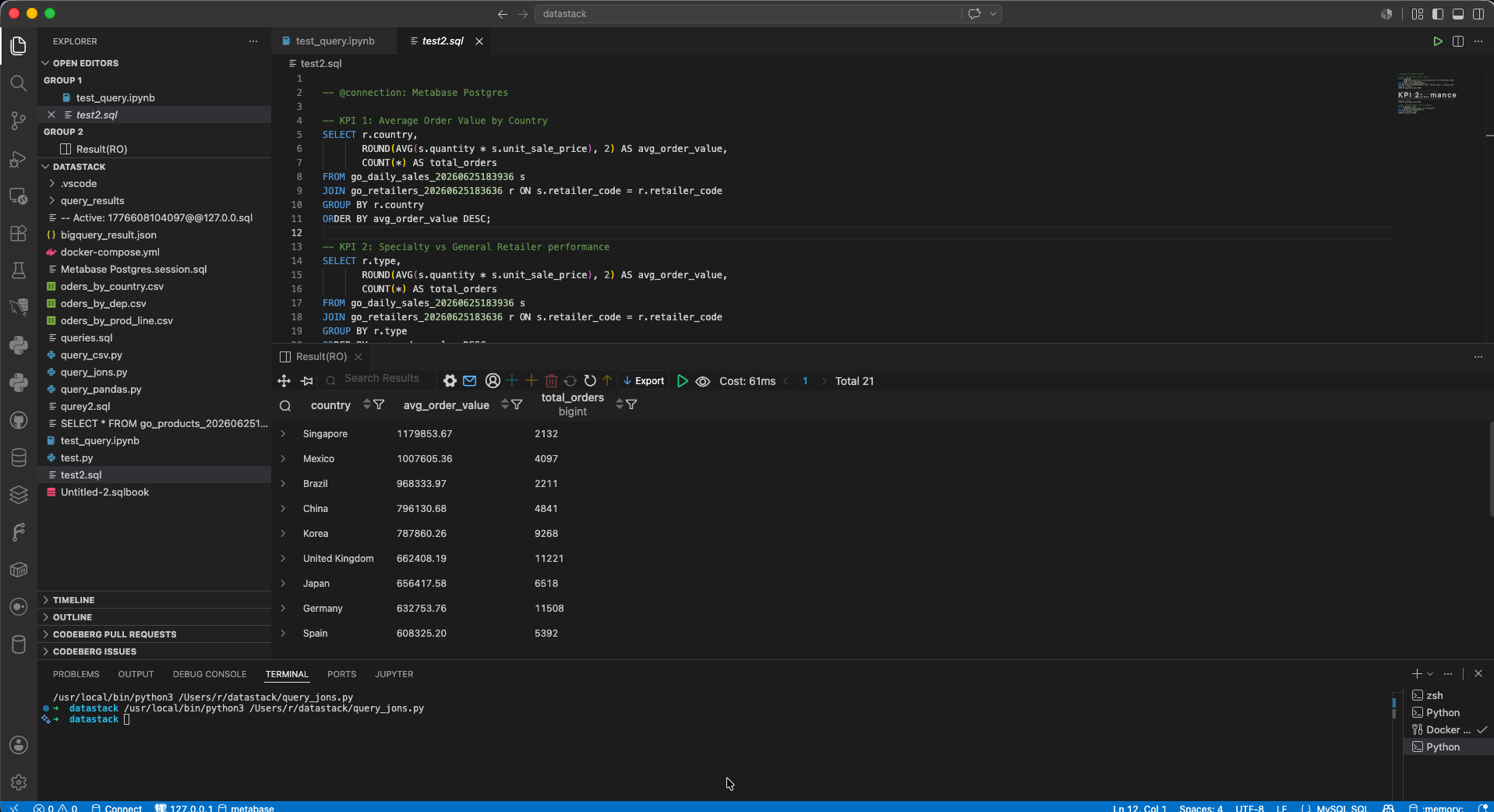
Plain SQL file connected to local Postgres 18 via SQLTools + PostgreSQL driver. The most direct approach — write SQL, press Cmd+Enter, see results instantly in the results panel below.
queries.sql → Postgres 18 → Result panel
World 1 — Local
📓 .sqlbook notebook
Cell-based SQL notebook format inside VS Code. Each query runs in its own block with results displayed inline — similar to Jupyter but pure SQL. Good for structured, step-by-step analysis.
Untitled.sqlbook → Postgres 18 → Inline results
World 2 — Team
🐍 .py script + BigQuery
Python scripts using google-cloud-bigquery to query the shared team dataset. Results exported to .csv or .json files programmatically — useful for reproducible data exports.
Jupyter notebook with Python + BigQuery client. SQL runs inside bq() helper function, results render as pandas DataFrames. Best for exploratory analysis and sharing with teammates.
test_query.ipynb → BigQuery → DataFrame
World 1 — Local Postgres query (SQLTools)
-- test2.sql — runs directly against local Postgres 18-- @connection: Metabase Postgres-- KPI 1: Average Order Value by CountrySELECT r.country,
ROUND(AVG(s.quantity * s.unit_sale_price), 2) AS avg_order_value,
COUNT(*) AS total_orders
FROM go_daily_sales_20260625183936 s
JOIN go_retailers_20260625183636 r ON s.retailer_code = r.retailer_code
GROUP BY r.country
ORDER BY avg_order_value DESC;
-- Result: Singapore 1,179,853 | Mexico 1,007,605 | Brazil 968,333
World 2 — BigQuery via Python script (with CSV export)
# query_csv.py — queries BigQuery, saves result to CSVfrom google.cloud import bigquery
import csv
client = bigquery.Client(project='mystical-proj-500509')
query = """
SELECT Country, COUNT(*) AS stores
FROM go_explore_project.retailers
GROUP BY Country
ORDER BY stores DESC
LIMIT 5
"""
rows = client.query(query).result()
with open('bigquery_result.csv', 'w', newline='', encoding='utf-8') as f:
writer = csv.writer(f)
writer.writerow(['Country', 'stores'])
for row in rows:
writer.writerow([row['Country'], row['stores']])
World 2 — BigQuery via Jupyter notebook
# Cell 1 — run once to set up the connectionfrom google.cloud import bigquery
client = bigquery.Client(project='mystical-proj-500509')
defbq(sql):
"""Run a BigQuery SQL query and return a DataFrame."""return client.query(sql).to_dataframe()
# Cell 2 — any subsequent cell is pure SQLbq("""
SELECT r.Country,
SUM(s.Quantity * s.Unit_sale_price) AS Total_Revenue
FROM go_explore_project.daily_sales AS s
JOIN go_explore_project.retailers AS r
ON s.Retailer_code = r.Retailer_code
GROUP BY r.Country
ORDER BY Total_Revenue DESC
""")
# → Renders as a formatted pandas DataFrame table in the notebook
Key comparison: Local Postgres queries return results in ~60ms with no internet required. BigQuery queries process on Google's infrastructure and return results via the authenticated gcloud connection — slower to start but handles much larger datasets and enables team collaboration on shared data.
Method
Target
Best for
Export
.sql + SQLTools
Local Postgres
Fast iteration, KPI queries
Via terminal / Metabase
.sqlbook
Local Postgres
Structured step-by-step analysis
Copy from results panel
.py script
BigQuery
Automated exports, reproducible runs
CSV / JSON directly
.ipynb notebook
BigQuery
Exploratory analysis, team sharing
pandas DataFrame / CSV
Key Learnings
What this project taught
🐳
Docker networking on Mac
Containers can't reach Mac's localhost directly. host.docker.internal is the required bridge — not documented prominently but essential.
🧹
Clean environment first
Removing 8GB of legacy Superset images before starting saved confusion. A clean Docker state makes debugging much faster.
📊
Metabase CSV upload
CSV → Postgres in seconds via Metabase's UI. No ETL pipeline needed for small datasets — a practical shortcut for rapid prototyping.
🔒
GDPR by architecture
When data never leaves your machine, compliance becomes structural rather than procedural. No DPA, no data transfer agreements needed.
⚡
SQL over GUI tools
Writing KPI queries in VS Code then running them in Metabase is faster and more reproducible than building charts through a visual drag-and-drop interface.
💰
Zero cost, full capability
The entire stack — Postgres, Metabase, VS Code — is free and open source. No subscription, no query costs, no vendor lock-in.