GRBL Board Upgrade 🔥 engraving + remote monitoring
🔥 A laser cutter dead since 2017, actually engraving again
ATMega2560 · GRBL 1.1f · CNCjs on a Pi 4 · SVG-to-G-code, homegrownSession 1 (Sept 9): wiring and the first freeze
The replacement board arrived — GRBL 1.1f on an ATMega2560, three A4988 stepper drivers, running off the existing 12V supply. Motors and endstops wired first; the laser itself deliberately left for later once the right connector was actually in hand.
01Motors & endstops
Straightforward remapping — X and Y motor coil pairs onto the new board's A/B terminals, endstop signal and ground onto their matching pins. Nothing exotic yet.
02GRBL speaks a different dialect than Marlin
Two small but important differences from the old Marlin/mLaser stack: GRBL fires the laser with M3/M5, not Marlin's M4 — and laser power is a S0–1000 range, not Marlin's P0–255. Every G-code habit from the old machine needed a small mental remap.
03Automatic homing freezes the board — work around it
The standard $H homing cycle reliably hung the controller — an endstop-interrupt issue with this specific board, not a wiring fault. Rather than chase the root cause immediately, a manual homing procedure (jog toward the endstops with short relative moves, watch for both Pn:XY flags, then G92 X0 Y0 to zero the origin) became the standing workaround for the rest of the project.
Session 2 (Sept 12): the laser actually fires
04Finding the real connector
The board turned out to be an Annoy Tools GRBL board, offering four different laser output options (12V 2-pin, 12V 3-pin, 12V 4-pin, 24V 3-pin). The Makeblock laser module needed the simple 12V 2-pin white JST — once identified, wiring was trivial.
05A genuine "oh, that's how laser mode works" moment
With $32=1 (laser mode) enabled, GRBL only fires the laser while the machine is actually moving — G1 X.. Y.. F.. S.. moves and fires together; a stationary M3 alone does nothing. Not a bug, just a genuinely different mental model from a simple on/off laser control.
06Two more wiring mistakes, both mechanical rather than logical
X and Y motor connectors had been swapped, and the X motor's direction wires needed a red/blue swap. Both fixed, both axes homing cleanly to the front-right corner.
Session 3 (Sept 13): calibration and a real workflow
07Steps/mm, hunted down by iteration
A commanded 50×30mm rectangle first came out at 104×62mm — the inherited 177.8 steps/mm value from the old Marlin setup was nowhere close to correct for this board's drivers and pulley ratio. Measured, corrected, re-tested, repeated:
08A real SVG-to-engraving pipeline
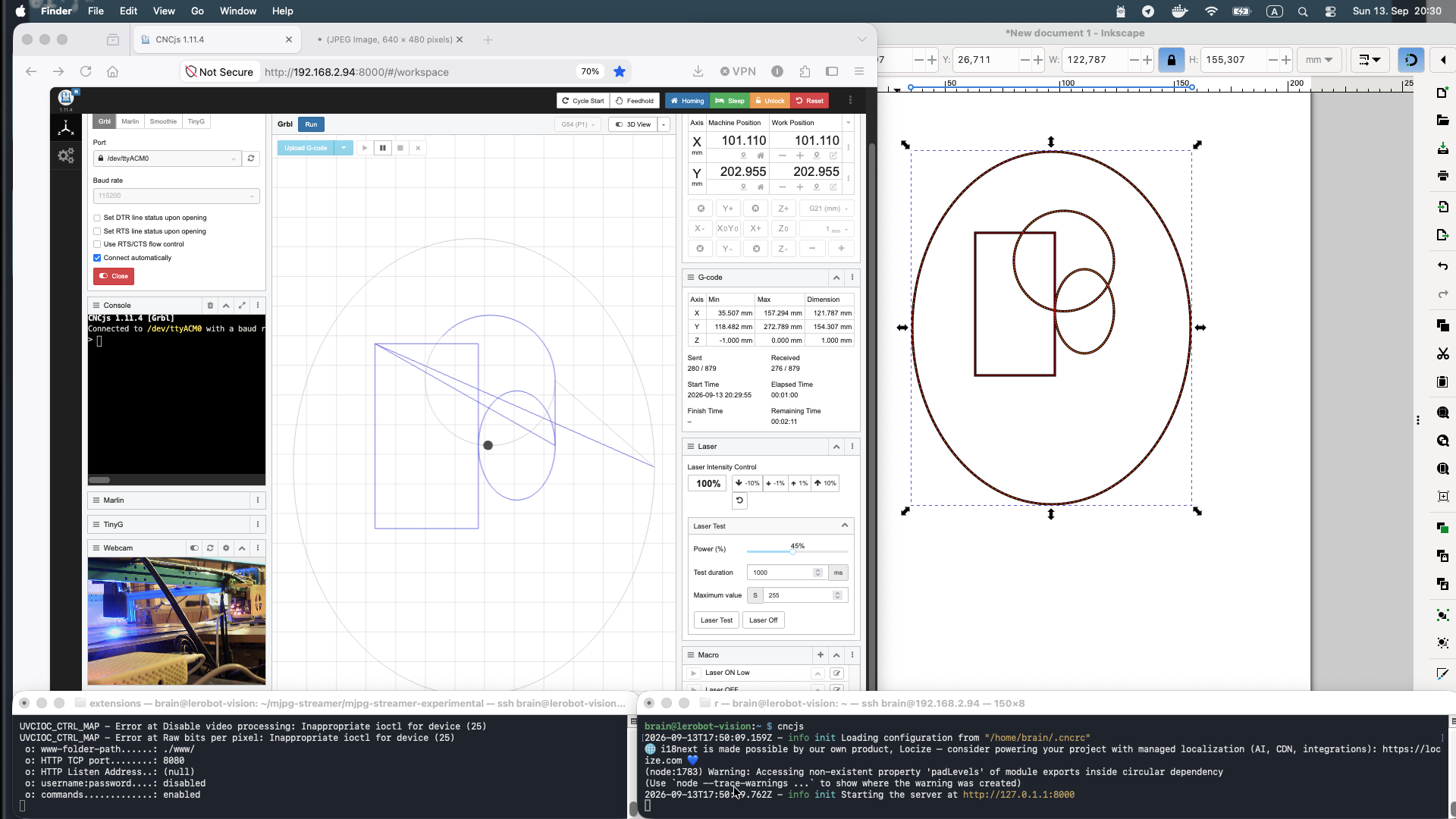
Design in Inkscape, save as Plain SVG, convert with a small custom svg_to_gcode.py script, upload the result to CNCjs running on the Pi 4, hit Cycle Start. Laser power tuned by result: 150 engraves paper without cutting through; 400 cuts through thin paper cleanly.
Session 4: the finishing touches
09Frame fixed to a real base
The frame's slight out-of-true wobble is gone — the whole machine is now mounted to a 5mm aluminum plate base. Genuine mechanical rigidity, not a workaround.
10The Pi 4 gets a proper home
Relocated onto the frame itself, right next to the GRBL board, inside a yellow 3D-printed housing sourced from Printables — which happens to match the machine's blue frame nicely. No more loose electronics hanging off the side.
11A proper Inkscape laser extension
Installed and tested the J Tech Photonics Laser Tool extension for Inkscape — a purpose-built plugin for exactly this workflow, working alongside the custom svg_to_gcode.py script from Session 3.
12The real hammer: streaming a webcam into CNCjs
The situation: a USB webcam (HD 720P, /dev/video0) on a headless Pi running CNCjs, needing to be viewed from a completely different machine's browser — direct browser camera access doesn't work here at all; what's actually needed is a real network video stream.
Solution: mjpg-streamer
sudo apt install -y cmake build-essential libjpeg-dev v4l-utilsIdentify the real camera device — USB webcams show up cleanly; ignore the Pi's internal bcm2835-codec ISP nodes, which aren't real cameras:
v4l2-ctl --list-devicesManual test run first:
export LD_LIBRARY_PATH=/usr/local/lib/mjpg-streamer
mjpg_streamer -i "input_uvc.so -d /dev/video0" -o "output_http.so -w /usr/local/share/mjpg-streamer/www -p 8080"
Made persistent with a systemd unit — /etc/systemd/system/mjpg-streamer.service:
[Unit]
Description=MJPG Streamer for webcam
After=network.target

[Service]
Environment=LD_LIBRARY_PATH=/usr/local/lib/mjpg-streamer
ExecStart=/usr/local/bin/mjpg_streamer -i "input_uvc.so -d /dev/video0" -o "output_http.so -w /usr/local/share/mjpg-streamer/www"
Restart=on-failure
RestartSec=5
User=brain

[Install]
WantedBy=multi-user.target
sudo systemctl daemon-reload
sudo systemctl enable --now mjpg-streamer.service
sudo systemctl status mjpg-streamer.service # confirmed: active (running)Troubleshooting notes, kept for next time:
- input_uvc.so only works with USB (UVC) cameras — CSI ribbon-cable camera modules need a libcamera-based approach instead
- "Permission denied" on /dev/video0 → add the user to the video group: sudo usermod -aG video $USER
- "Device busy" → check what else has it open: sudo fuser /dev/video0
What was actually achieved
- ✅ Replacement carriage plates printed in PETG (own FreeCAD design)
- ✅ Loose motor connectors and belt tensioner orientation fixed
- ✅ Makeblock MegaPi (Marlin, 2016) replaced with a modern GRBL 1.1f board
- ✅ Motors, endstops, and laser wired and configured correctly
- ✅ Manual homing procedure working reliably
- ✅ Laser firing and engraving, power-tuned for paper
- ✅ CNCjs running headless on a Pi 4
- ✅ A real SVG → G-code → engrave workflow, via both a custom script and the J Tech Inkscape extension
- ✅ Frame mounted to a rigid 5mm aluminum base
- ✅ Pi 4 rehoused on-frame, next to the GRBL board, in a color-matched enclosure
- ✅ Live remote webcam monitoring via mjpg-streamer, integrated directly into CNCjs
Still on the list
One honest item left, and it's the one that actually matters for safety:
- ☐ A proper enclosure around the machine — mainly for safety around the open beam